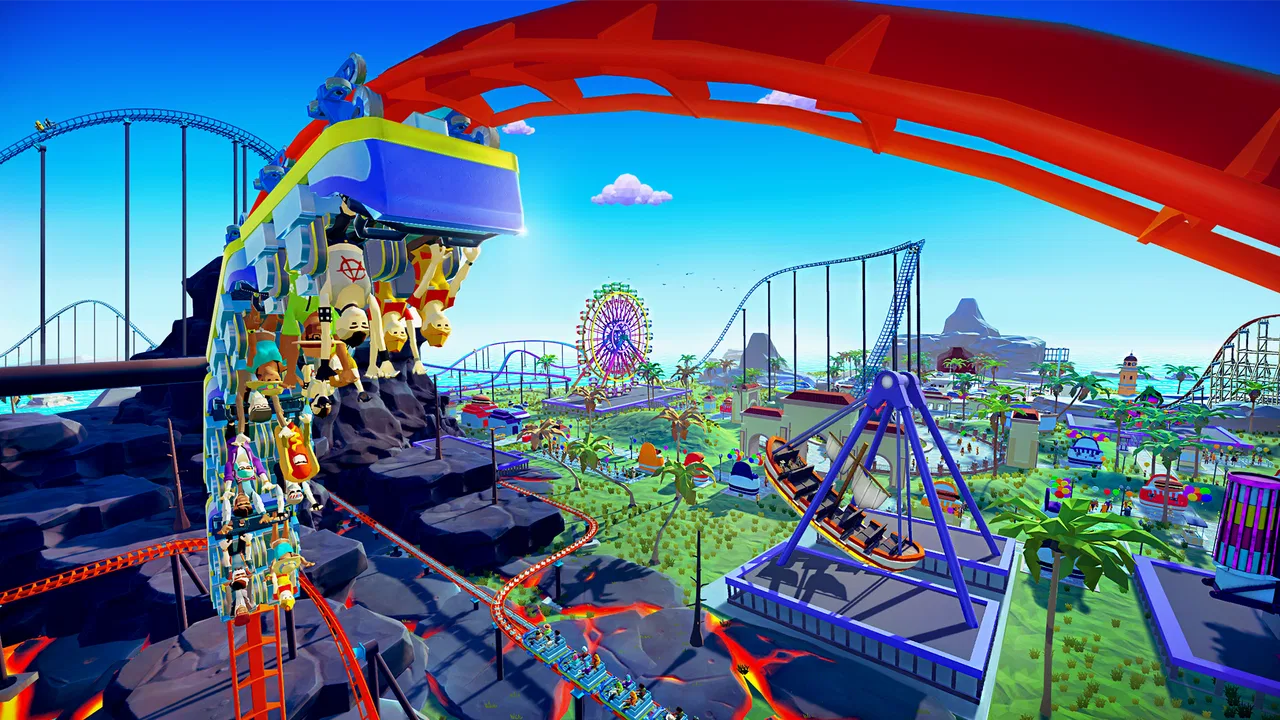
Real Coaster: Idle Tycoon
- 4.8
- Rating
- 10.00M
- Installs
- Free
- Price

 Analysis by App-foxy
Building a theme park sounds relaxing until a coaster refuses to earn enough, an upgrade seems to stall, or a short break turns into a much longer session. Real Coaster: Idle Tycoon is a free simulation game from Raventurn Games that focuses on creating roller coasters and growing a park through idle progress. I found its appeal in the small decisions between rides: where to spend resources, when to improve an attraction, and whether to keep playing actively or let the park continue while I am away.
The game is aimed at players who enjoy gradual progress rather than a demanding management simulator. It is rated for Everyone, works on devices running Android 6.0 or later, and has reached over ten million installs. Its average rating is 4.8 from around 114 thousand ratings, which suggests that the straightforward coaster-building loop has connected with a large audience. That popularity does not make every part perfect, though. The experience is intentionally simple, and anyone expecting a detailed park-design tool may find it lighter than expected.
What playing Real Coaster feels like day to day
My first impression was that this is best understood as a compact idle management game with a roller-coaster theme, not as a full construction sandbox. The central satisfaction comes from seeing the park develop over time and using the income from one improvement to reach the next. The rhythm is easy to understand: check the park, make a useful upgrade, collect or improve progress, and return later when more resources have accumulated.
You May Also Like

 Blood Strike: 2.5 Anniversary
Blood Strike’s Loadouts Turn Every Drop Into a Tactical Gamble
A close look at Blood Strike’s custom loadouts: how fast access to signature weapons reshapes its battle royale rhythm, rewards preparation, and narrows the gap between fights.

 Pandora - Music & Podcasts
Pandora’s Music Is Easy to Start, but Harder to Recover
Pandora’s strength is its low-effort path from a seed to a station. Its weak spot is how much confidence it asks you to place in connection, setup, and quiet recovery.

 8 Ball Pool
 Is Built on Rivalries, Rematches, and Routine
A close look at the rivalries, rematches, shared routines, and unanswered safety questions that turn a quick pool match into a persistent mobile community.

 Samsung Music
’s Quiet Strength Is Playing What You Already Own
Its reach comes less from spectacle than from dependable access to a personal library. That simplicity is both the app’s strongest retention engine and its ceiling.

 AccuWeather: Weather Radar
AccuWeather Review: A Quick, Clear Forecast for Everyday Decisions
For everyday plans, the best forecast is the one you can understand quickly. AccuWeather makes rain timing, radar, and local conditions easy to act on, with a few trade-offs.

 Hill Climb Racing
Why Hill Climb Racing Still Turns Crashes Into One More Run
A tiny car, a bumpy hill and one more upgrade: Hill Climb Racing keeps resurfacing because its simple chaos makes every near-miss feel personal.
More From Our News Desk



That simplicity makes it suitable for short sessions. I can open it while waiting for a bus, make a few decisions, and close it without needing to remember a complicated chain of objectives. It also works for a longer sitting when I want to compare upgrade choices and push the park forward. The game does not require the same attention as a traditional strategy title, so it fits better into spare moments than into a dedicated evening of deep planning.
The strongest part of the design is the visible connection between the coaster theme and the progression. Improvements feel more satisfying when they make the park look or operate like a larger attraction, rather than merely increasing an abstract number. Even when the underlying loop is familiar, the theme gives the repeated upgrades a clear purpose: I am not just collecting currency, I am trying to turn a modest attraction into a more impressive park.
There is also a useful distinction between active and idle play. Active play lets me make progress immediately by checking available improvements and deciding where the next investment should go. Idle progress is more convenient, but it can make the game feel slower if I only open it briefly and have no meaningful upgrade ready. I recommend treating idle earnings as support for a plan rather than as the entire game. The best sessions come from returning with a specific improvement in mind.
Where new players are most likely to get stuck
The first common stumbling block is spending resources on whatever upgrade looks available instead of considering what will improve the next stage of progress. In an idle game, an early purchase can feel harmless, but several small choices can leave the park producing too slowly. I found it better to pause for a moment and ask whether an upgrade improves immediate income, unlocks a more useful part of the park, or simply makes the current screen look more complete.
Another point of friction is the expectation that every return to the game will produce a dramatic jump. Idle progress is usually more gradual. If the park seems to be moving slowly, that does not automatically mean the game is broken. It may simply mean that the current upgrade path needs a little patience or that the available resources have been spread too widely.
Players can also get confused when they compare their experience with videos or screenshots from people further ahead. A developed park naturally presents more options than a new one, so copying another player’s visible layout or priorities may not translate well to an early save. I would use other players’ examples for inspiration, not as a strict order of operations.
The game can feel repetitive if I approach it as a constant stream of new content. Its pleasure is incremental: a better attraction, a more productive park, and a clearer sense of growth. That makes it a poor match for anyone who needs frequent surprises or complex missions. It is a better fit for someone who enjoys watching a small system become more efficient.
Setup checks before blaming the game
Because this is a free game with optional purchases ranging from $0.99 to $99.99 per item, I recommend deciding in advance how you want to play. The core appeal is the gradual building loop, so there is no need to treat every purchase prompt as part of normal progress. If you prefer a completely controlled budget, keep purchases disabled through your device settings and approach the game as a patient, no-spend simulation.
It is also worth checking the device before installing. The minimum operating-system requirement is Android 6.0, so older hardware or outdated software may create problems before the game itself has a chance to run properly. I would make sure the device has enough free storage, close demanding apps, and install the current version, which is 1.0.803. These are simple checks, but they remove several avoidable causes of crashes, slow loading, or failed updates.
If the game opens but feels sluggish, I would first restart the device and close background apps rather than immediately reinstalling. A restart can clear temporary strain, while freeing storage can help with updates and general stability. Reinstalling should be a later step, because it may affect locally stored progress depending on how the game handles saves on the device.
Connection problems deserve the same careful approach. If a screen takes a long time to load or a purchase-related action does not respond, I would test the connection in another app, switch between Wi-Fi and mobile data when appropriate, and try again later. A weak connection can look like a game error even when the local installation is fine. I would avoid repeatedly tapping a purchase button while waiting, since delayed responses can make it unclear whether an action has already registered.
For a child using the game, the Everyone age rating makes the title broadly accessible, but that does not remove the need for sensible purchase controls. The optional item prices can vary widely, so family device settings are more reliable than relying on a child to understand every prompt. This is especially important in an idle game, where the desire to speed up progress can make optional spending feel tempting.
A recovery routine when progress seems wrong
When the park appears not to be progressing, I use a simple recovery routine. First, I check whether the game has actually completed its current action or whether a screen is still loading. Next, I leave the game normally, reopen it, and look at the park before making another purchase. This gives the session a chance to refresh without immediately changing several variables at once.
If the problem is that income feels too low, I review my last few upgrades rather than buying randomly. A useful recovery question is: did I improve the part that produces progress, or did I spend on something that only feels rewarding visually? The answer helps me choose the next purchase with more discipline. In an idle title, recovering from an inefficient choice usually means making a few focused upgrades, not starting over immediately.
When an update is available, I install it through the normal app store process and restart the game afterward. If the game still behaves strangely, I check whether the device has enough free space and whether other apps are experiencing similar problems. Clearing temporary app data can sometimes help with a damaged local cache, but I would only use that step after checking how progress is stored. Clearing data is not the same as clearing a cache, and it can remove local information.
I would be especially cautious about uninstalling. A fresh installation may solve a damaged installation, but it can also create a save problem if progress is stored locally rather than restored automatically. Before taking that step, I would look for any in-game account or save option that I already use and make sure I understand how the game restores progress. If there is no clear recovery route, restarting the device and updating are safer first moves.
Purchase issues should be handled separately from gameplay issues. If an item does not appear after a transaction, I would avoid buying it again immediately. I would check the device’s purchase history and allow time for the transaction to process, then use the official store support route if necessary. Repeated attempts can turn a temporary delay into multiple charges, so patience matters more here than speed.
When the app is not really the cause
Some frustrations come from the nature of idle games rather than from a technical fault. If the park grows slowly while I am away, that may be the intended pacing. If I return and have only a small decision to make, that may reflect the game’s short-session design rather than missing content. Understanding this distinction prevents unnecessary troubleshooting and makes it easier to decide whether the game suits my habits.
Hardware also changes the experience. A device that technically meets the minimum operating-system requirement may still feel less comfortable if it is old, crowded with apps, or running low on storage. Heat, battery-saving modes, and aggressive background restrictions can affect how smoothly any game behaves. If other games also stutter or close unexpectedly, I would investigate the device before treating Real Coaster as the sole problem.
Network conditions can create misleading symptoms too. A game may appear unresponsive during a poor connection, while the same action works normally later. Testing another network, restarting the connection, and checking whether the issue affects other services can quickly separate a local problem from a temporary service interruption. I prefer this method to repeatedly changing game settings without knowing what caused the issue.
Expectations are another important factor. Compared with a traditional theme-park simulator, this game offers a more relaxed and automated experience. A detailed alternative may provide more control over paths, scenery, staff, finances, and visitor behavior, while Real Coaster keeps the focus on accessible progression around roller coasters. Compared with a basic idle clicker, however, its park theme gives the numbers a more concrete setting. The right comparison depends on whether I value depth or convenience.
Who will enjoy it, and who should skip it
I would recommend it to players who like visible progress, short sessions, and the feeling of improving a small attraction over time. It is particularly suitable for someone who wants a simulation game that can be checked casually rather than managed continuously. The Everyone rating also makes it a broadly approachable choice, although adults should still manage optional purchases on shared devices.
It is less suitable for players who want realistic engineering, detailed coaster design, or complete control over every visitor and park facility. The idle structure also will not satisfy someone who dislikes waiting or repeated upgrade cycles. If I wanted a deep construction challenge, I would choose a more involved theme-park simulator. If I wanted a completely hands-off experience with almost no decisions, I might choose a simpler idle title instead.
One practical use case is a short daily routine. I can open the game during a coffee break, inspect what the park earned, choose one focused upgrade, and close it before the session becomes a distraction. Another is using it as a low-pressure game after a demanding day: there is enough decision-making to feel involved, but not so much that I need to study a manual or remember a complicated strategy.
My main advice is to set a personal stopping point. Idle games can encourage frequent checking, especially when a new upgrade is close. I get more enjoyment when I decide whether I am playing for five minutes or for a longer session, then leave the game alone when the next improvement would require nothing but waiting. That keeps the park-building loop enjoyable instead of turning it into a background obligation.
My practical verdict
Real Coaster: Idle Tycoon succeeds because it makes a familiar idle formula easy to understand through a cheerful roller-coaster setting. Raventurn Games keeps the focus clear: build up the park, improve its attractions, and return as progress accumulates. The game is free, has a large player base, and its 4.8 average from around 114 thousand ratings reflects a strong reception, though popularity should not be confused with endless variety.
I like it most when I treat it as a calm progression game rather than a serious management simulator. The best results come from focused upgrades, sensible expectations, and a little patience with idle earnings. Before installing, I would check that the device runs Android 6.0 or later, has enough space, and is comfortable with optional purchases that can reach $99.99 per item.
My recommendation is simple: choose it if you want a friendly coaster-themed idle game for short, repeatable sessions. Skip it if you need intricate construction tools, realistic park economics, or constant new challenges. For the right player, it is an easy game to return to, and its strongest feature is not complexity but the satisfying sense that every small improvement makes the park feel a little more complete.
After spending time with it, I would keep it installed as a casual game rather than a main simulation experience. When something goes wrong, I would start with device, storage, connection, and update checks before assuming the park itself is at fault. That combination of modest expectations and focused play gives the game its best chance to be enjoyable: a lightweight coaster project that grows steadily whenever I have a few minutes to spare.
FAQs for Real Coaster: Idle Tycoon
01What is Real Coaster: Idle Tycoon about?
Real Coaster: Idle Tycoon is a casual amusement-park management game centered on building and expanding your own theme park. You begin with a small attraction and gradually unlock roller coasters, rides, shops, decorations, and additional park areas. The idle system allows the park to continue generating income while you are away, although returning regularly helps you collect rewards, upgrade attractions, and progress more efficiently.
02How does the idle gameplay work in Real Coaster: Idle Tycoon?
The game automatically earns money from your attractions as visitors use them, even when you are not actively playing. When you return, you can collect accumulated earnings and invest them in upgrades, new rides, staff improvements, and other facilities. Active play is still useful because completing objectives, watching optional reward videos, and making strategic upgrades can significantly increase income and speed up park development.
03Can I play Real Coaster: Idle Tycoon without an internet connection?
The game may allow some basic management or idle features to function offline, but the full experience can depend on an internet connection. Online access is commonly required for advertisements, cloud-related features, special events, updates, and certain reward systems. If you plan to play while traveling or without reliable data, it is best to test offline functionality first and avoid assuming every feature will remain available.
04Is Real Coaster: Idle Tycoon free to download and play?
Real Coaster: Idle Tycoon is generally available as a free download, allowing players to build a park without paying an upfront purchase price. However, free-to-play elements may include optional in-app purchases for premium currency, faster upgrades, special bundles, or other advantages. Advertisements can also be part of the progression system, so users should review the store listing and device purchase settings before downloading.
05Is Real Coaster: Idle Tycoon suitable for children?
Real Coaster: Idle Tycoon is easy to understand and does not usually require advanced gaming skills, making its management mechanics accessible to younger players. Nevertheless, parents should check the age rating, advertising content, privacy information, and in-app purchase options before allowing children to play. Because progress can be connected to optional purchases or rewarded ads, parental controls are recommended on shared devices.
Pros
- Simple idle mechanics make it easy to progress with short play sessions.
- Theme-park expansion gives the game a satisfying sense of long-term growth.
- Bright visuals and lively coaster animations suit casual players.
- Multiple attractions add variety beyond managing a single roller coaster.
- Offline earnings help maintain progress when you are not actively playing.
Cons
- Progress can slow noticeably when upgrades become more expensive.
- Frequent ads may interrupt the experience or be needed for extra rewards.
- The management systems remain fairly basic for experienced tycoon players.
- Limited strategic depth may make the gameplay feel repetitive over time.
- Some premium upgrades can make faster progress feel dependent on spending.

Real Coaster: Idle Tycoon
Gallery